UTM builder for Chrome
Chrome extension · v1.0.0
Builds a tagged campaign URL and tells you what's wrong with it before you ship the link.
What it asks for
- storage
- Holds your saved presets, the last ten links you copied, and whatever is half-typed in the form, so the popup picks up where you left it. All of it sits in chrome.storage.local on your own machine.
What it doesn't
- No host permissions. It has no way to read, change, or even see the pages you visit.
- No content scripts. Nothing is injected into a page, because it never touches one.
- No network requests of any kind - no analytics, no telemetry, no remote code. It works with the wifi off.
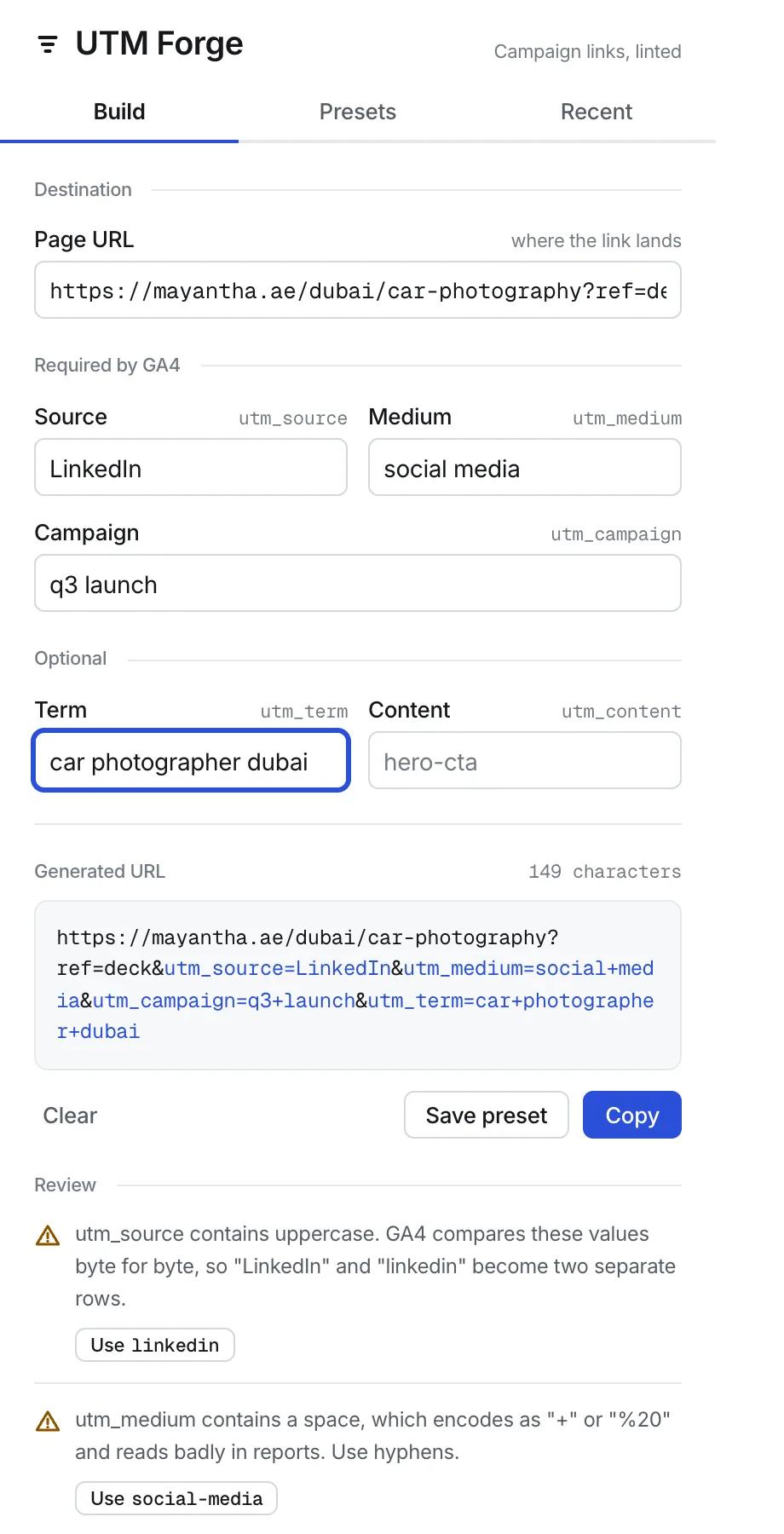
There's nothing to use on this page - this one is a Chrome extension, so the builder lives in the toolbar, one click from whichever tab you're already in. It assembles a tagged campaign URL and then reviews it, which is the part most UTM builders skip.
The mistakes are boring, and they cost you the report
Nothing dramatic goes wrong with a UTM. What goes wrong is that GA4 compares these values byte for byte, so "Email" and "email" arrive as two separate rows and the campaign you're trying to read is split down the middle. A space in a campaign name turns up as "summer+sale". A medium of "ppc" never sorts into Paid Search, because Google is looking for "cpc". Every one of those is invisible while you're building the link and obvious six weeks later, when someone asks what the campaign actually did and the honest answer is that it's in two places.
What the linter checks
- Uppercase anywhere in a value, with the lowercase version one click away.
- Spaces, which encode as "+" or "%20" and read badly in every report you'll ever open.
- Casing that's inconsistent across the set, so one campaign doesn't arrive in halves.
- Mediums Google doesn't recognise - e-mail, ppc, social-media, newsletter - each mapped to the value that sorts into a default channel group.
- Shorthand sources like fb or yt, which won't merge with the traffic Google already attributes.
- A missing source, medium or campaign. That trio is what GA4 needs before it can group anything.
- A destination URL that's invalid, or that already carries UTM parameters of its own.
None of it blocks you. The warnings sit under the generated link in plain language, each one saying what it costs rather than just flagging it, and most come with a button that rewrites the value for you.
It keeps the query string you already had
If your link already carries parameters - a ref, a session id, a fragment that jumps to the pricing section - they survive. UTM values are merged and overwritten in place rather than blindly appended, and the fragment stays at the end where it belongs. Paste a bare domain and it adds the https:// for you. Paste something that can't carry campaign parameters and it says so instead of producing a link that quietly does nothing.
Presets, because you type the same three values every week
Save a source, medium and campaign combination under a name and apply it in one click. The last ten links you copied stay in a list you can load straight back into the form, which is mostly there for the moment you notice the campaign name has a typo in it and the email has already gone out.
It can't see the pages you visit
One permission: storage, for your own presets and history, kept on your machine. No host permissions, no content scripts, and no network requests at all - no analytics, no telemetry, nothing loaded from a server. It runs fine with the wifi off, which is the shortest way to prove nothing is being sent anywhere.
FAQ
- What is a UTM parameter?
- Five optional tags you add to the end of a link - source, medium, campaign, term and content - that tell Google Analytics where a visitor came from. Without them, most traffic lands in a bucket marked direct and you're guessing.
- Why does uppercase in a UTM matter?
- GA4 treats the values as case-sensitive strings. "Email" and "email" become two separate rows, so one campaign is reported as two half-campaigns. Lowercase everywhere is the safe convention, and the linter flags anything that breaks it.
- What should utm_medium be for a paid search ad?
- cpc. Google's default channel grouping looks for cpc, ppc and paidsearch, and "ppc" on its own is the one people reach for that doesn't sort cleanly. Email is email, organic social is social. Invent a medium and it lands in Unassigned.
- Does it keep the parameters already on my URL?
- Yes. Existing query parameters are preserved, UTM values are merged in and overwritten in place rather than appended twice, and a #fragment stays at the end.
- Can it read the pages I browse?
- No, and it's built so it can't. It asks for one permission - storage - and holds no host permissions and no content scripts, so it has no access to any page. It also makes no network requests.
- Is it free?
- Yes. No account, no trial, no upgrade screen. Your presets and history stay in your own browser.