Font identifier for Chrome
Chrome extension · v1.0.0
Hover any element and read its typography - including which font is really rendering, not just the one the stylesheet asked for.
What it asks for
- activeTab
- Lets it read computed styles on the tab you clicked the icon on, and only that tab. The grant expires when you navigate away.
- scripting
- Injects the overlay on that click. There's no static content script, so nothing goes into any page until you ask for it there.
What it doesn't
- No host permissions, so it has no standing access to any site.
- No storage, no backend, no network requests. Values leave the overlay only when you press Copy, and they go to your clipboard.
- It reads the page and never modifies it. The overlay lives in a shadow root with its own reset, so it can't restyle the page or be restyled by it.
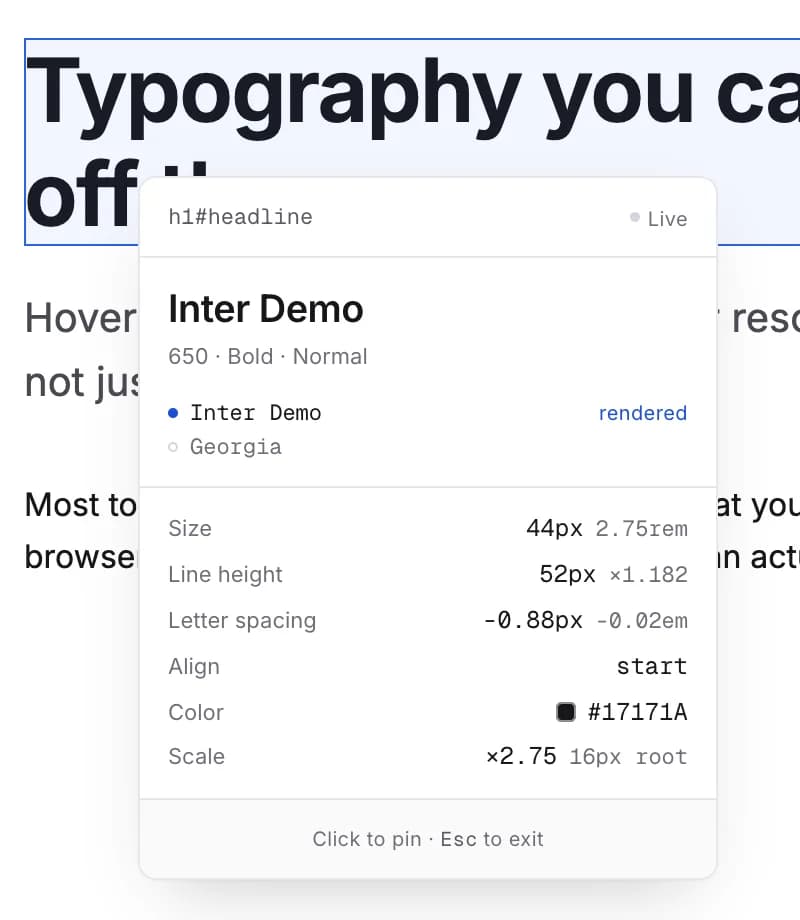
This is a Chrome extension, so there's no box to paste into here. Click the icon to turn inspect mode on, hover anything, and a readout appears next to the cursor. Click to freeze the panel so you can work with it. Click the icon again, or press Esc, and the overlay takes itself off the page.
The stack is a wish, not a result
Every other inspector echoes the font-family stack back at you. Inter, "Helvetica Neue", Arial, sans-serif tells you nothing about which of those four the browser actually picked, and the answer changes per machine - the webfont didn't load, the licence only covers one weight, the CDN is blocked on a corporate network, someone shipped a stack where the second name is the one doing all the work. Type Inspector walks the stack, tests each family against the fonts genuinely available to that page, and shows you the one that's rendering, with the rest listed underneath and the unavailable ones marked. That's the answer to "what font is this" that a stack on its own can't give you.
What it reads off an element
- The rendered family, resolved rather than declared, with the full stack underneath.
- Weight as a number and a name, so 600 also says Semibold, plus font-variation-settings on a variable font.
- Size in px and rem, and a type-scale ratio against the root size - the number you need when you're rebuilding somebody's scale.
- Line height in px and as a unitless ratio, because one of those is what you'll type into the CSS.
- Letter spacing in px and em, plus transform, alignment and stretch when they're set.
- Colour as hex, with the alpha percentage when it's translucent.
Copy as CSS, or as Tailwind
Pin the panel and you get two buttons. One produces a clean declaration block with the no-op declarations stripped out, so you're not pasting normal and start into your stylesheet. The other produces the Tailwind equivalent, using the default scale where a value matches it and an arbitrary-value class where it doesn't, so the result is exact rather than approximately right. Rebuilding a page you've been sent as a link is the job this was built for.
It stays out of the page's way
The overlay lives in a shadow root with a full style reset, so the page's own CSS can't bleed into the readout and distort the thing you're trying to measure. It renders the same on a bare reset and on the most hostile stylesheet you can find. It never inspects itself, and it unbinds every listener when you switch it off - an overlay that nudges the layout it's measuring is worse than no tool at all, because now you're debugging the thing you brought with you.
What it asks for
Two permissions, and only after you click: activeTab for the tab in front of you, and scripting to inject the overlay. No host permissions, no storage, no servers, no analytics. One honest footnote: its manifest does carry an all-URLs entry, and it isn't a permission - it declares which of the extension's own files a page is allowed to load, which the overlay needs to render its modules and its two bundled fonts. It grants no access to any page.
FAQ
- How do I find out what font a website is using?
- Turn inspect mode on, hover the text, and read the top line of the panel. It's the resolved family - the one the browser actually chose out of the stack - not the whole list of candidates the stylesheet asked for.
- How is that different from DevTools?
- DevTools shows you the computed font-family, which is the declared stack. This resolves which family in that stack is genuinely rendering, marks the ones that aren't available, and does it on hover instead of after you've found the element in a tree forty divs deep.
- Does it identify fonts in images or logos?
- No. It reads real text nodes and their computed styles. A wordmark that's an SVG or a JPEG has no typography for a browser to report, so nothing can read it off the page - that's a job for a font-matching service.
- Can I copy the styles out as Tailwind classes?
- Yes. Pin the panel and hit Copy as Tailwind. It uses the default scale where a value matches and arbitrary-value classes where it doesn't, so what you paste renders identically rather than nearly.
- Will it break the page it's inspecting?
- It shouldn't. The overlay sits in a shadow root with its own style reset, reads computed values without writing any, and removes itself along with its listeners when you press Esc.