Colour palette extractor for Chrome
Chrome extension · v1.0.0
Pulls the dominant colours off whatever is on screen, with the share of the screen each one covers, and exports them five ways.
What it asks for
- activeTab
- Lets it take one capture of the visible part of the tab you clicked the icon on. Your click is the grant, and it covers that tab only.
- scripting
- Runs one function in that tab which returns the hostname and the title - the label in the header, and the comment on the exported CSS so you know which page a palette came from. It also doubles as the check for pages Chrome won't let any extension read.
What it doesn't
- No host permissions, no <all_urls>, and no background worker. Nothing is running while the popup is shut.
- No storage. The capture becomes a small pixel buffer, gets sampled, and is dropped when you close the popup.
- No network code at all - no fetch, no sockets. It has nowhere to send anything even if it wanted to.
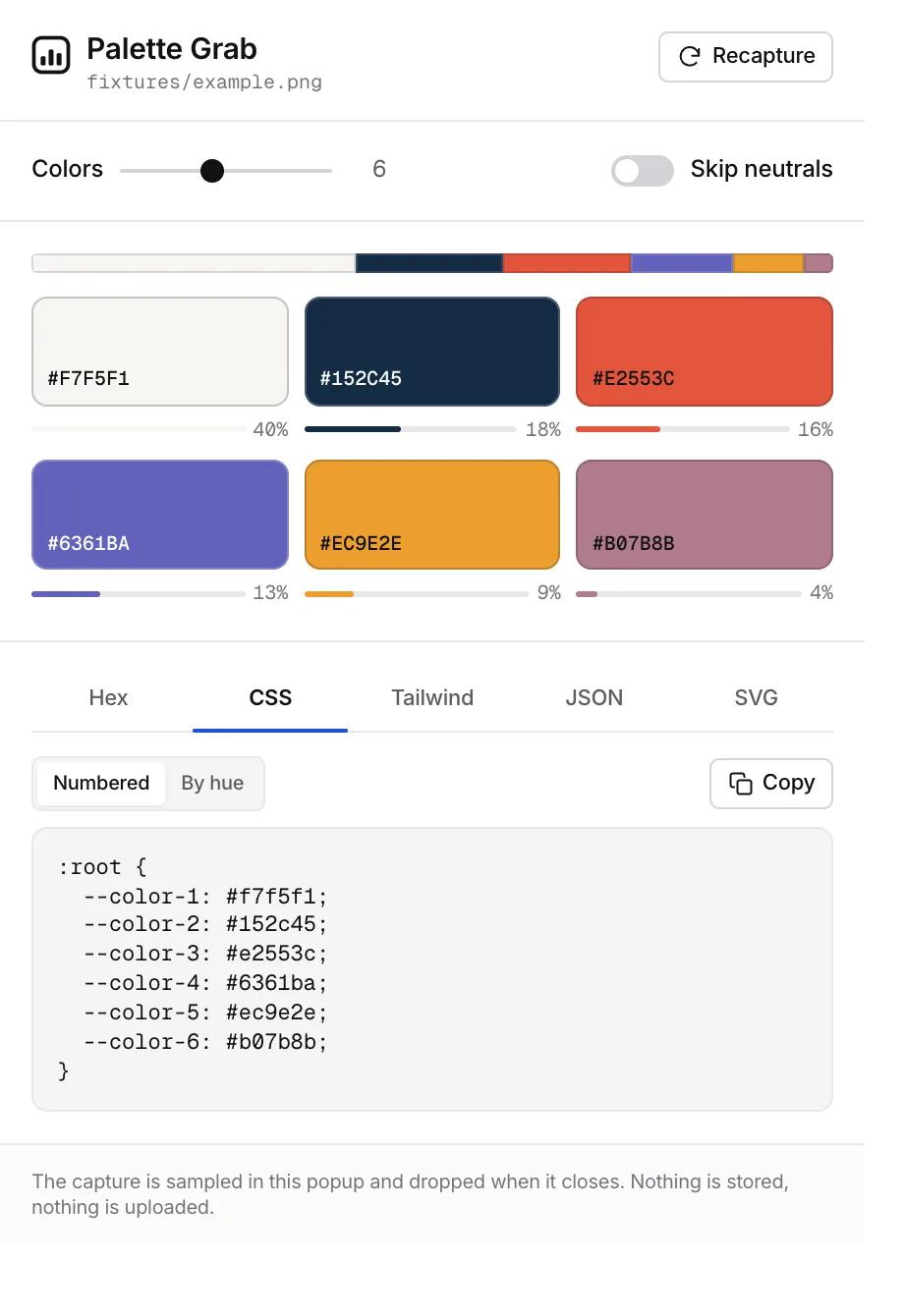
Another Chrome extension rather than something on this page: click the icon, and it reads the visible part of the tab you're on, quantises it, and hands you the dominant colours with their hex, RGB and HSL values - plus how much of the screen each one actually covers, which is usually the more interesting number.
Why most colour pickers hand back mud
Counting pixels doesn't work on a photograph. An image contains thousands of near-identical values, so "most common RGB" returns six versions of the same grey and you learn nothing. This runs a median-cut quantiser instead: it subdivides colour space rather than tallying values, so every colour that comes back represents a genuinely distinct region of the image. Gradients, photography and video frames all return a palette you can use, rather than a gradient's worth of one colour.
What you get
- Three to ten colours, adjustable live - move the slider and it requantises, no re-capture needed.
- Hex, RGB, HSL and a dominance share for every colour.
- A toggle that skips near-white, near-black and grey, which otherwise win every screenshot and are rarely what you came for.
- Click a swatch to copy its hex. The label stays readable because its colour is contrast-checked against the swatch it's sitting on.
- Scroll and recapture to sample a different part of the page.
Five exports
- Hex, as a plain list to paste anywhere.
- CSS, as a :root block of custom properties, numbered or named by hue - --color-blue, --color-sand.
- Tailwind, as a valid theme.extend.colors object you can drop into a config.
- JSON, with hex, rgb, hsl and share, for when it's feeding something else.
- SVG, as a proportional palette strip that drops into Figma or a README.
It reads a capture, not the page's images
This is the part worth knowing, because it's why so many colour pickers quietly fail on the exact sites you want to sample. Drawing a cross-origin image into a canvas taints the canvas, and reading the pixels back then throws a security error. So a picker built the obvious way works on your own test page and dies on somebody's photography. Capturing the visible tab sidesteps it entirely and works on cross-origin images, embedded video frames and canvas alike. The trade-off is honest: Chrome won't let any extension capture its own pages, so chrome:// tabs, the Web Store and the PDF viewer are out, and the popup says so instead of failing quietly.
What it asks for
Two permissions, both on the click: activeTab to take the capture, and scripting for the one function that returns the page's hostname and title. There's no storage permission, no host permissions and no network code - the capture is downscaled to a small pixel buffer, sampled, and dropped when the popup closes. There's no background worker either, so when the popup is shut nothing of it is running.
FAQ
- How do I get the colour palette from a website?
- Open the page, click the icon, and the popup shows the dominant colours with their hex values and how much of the screen each covers. Scroll to a different section and recapture if the part you want isn't on screen.
- Why not just use an eyedropper?
- An eyedropper gives you one pixel. This gives you the set, ranked by how much of the page each colour holds, which is the thing you need when you're reverse-engineering somebody's palette rather than matching a single swatch.
- Can it export to Tailwind?
- Yes - a valid theme.extend.colors object. There's also a :root block of CSS custom properties, plain hex, JSON with the dominance shares, and an SVG strip for Figma or a README.
- Does it work on pages with cross-origin images?
- Yes, and that's the point of capturing the tab rather than reading the page's image elements. Pulling a cross-origin image into a canvas taints it and reading the pixels back throws a security error, which is where most colour pickers give up.
- Is the screenshot uploaded anywhere?
- No. There's no network code in the extension and no storage permission. The capture is sampled in the popup's own memory and discarded when you close it.